Maven Group ID & Artifact ID: A Simple Example
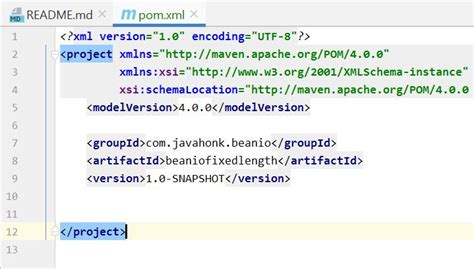
Maven Group ID & Artifact ID: A Simple Example
Hey guys, let’s dive into the world of Maven and unravel the mystery behind Group ID and Artifact ID . If you’ve been wrestling with Maven dependencies, you’ve probably seen these terms pop up everywhere. Think of them as the unique address for every single piece of code, or dependency , that your Java project might need. Getting a solid grasp on these is super crucial for managing your project effectively. So, buckle up, and let’s break down what they are and why they matter, with a real-world example to make it stick!
Table of Contents
- Understanding the Basics: What Are Group ID and Artifact ID?
- Why Are They So Important, Anyway?
- Crafting Your Own Group ID and Artifact ID: Best Practices
- A Real-World Maven Group ID and Artifact ID Example
- Common Pitfalls and How to Avoid Them
- Beyond the Basics: Scope and Type in Maven Coordinates
- Conclusion: Mastering Maven IDs for Project Success
Understanding the Basics: What Are Group ID and Artifact ID?
Alright, picture this: you’re building a giant Lego castle, and you need specific bricks. In the world of Java development with Maven, these bricks are called
dependencies
. Now, how do you make sure you’re grabbing the
exact
brick you need from a massive warehouse full of them? That’s where
Group ID
and
Artifact ID
come in. They work together, like a postal address, to uniquely identify a particular library or module. The
Group ID
is like the name of the company that makes the Lego bricks – say, “Lego Corp.” It’s typically a reversed domain name, like
com.example.mycompany
. This helps avoid naming conflicts and groups related projects together. Then, the
Artifact ID
is the specific name of the brick – like “Basic Red Brick 2x4”. In Maven terms, this would be something like
my-awesome-library
. Together,
com.example.mycompany:my-awesome-library
tells Maven exactly which piece of code you’re looking for. It’s this combination that ensures you download the right version of the right library without any confusion. Without these unique identifiers, Maven would have no clue which dependency you want when there are thousands of similar libraries out there. It’s the foundation of dependency management, really.
Why Are They So Important, Anyway?
So, why all the fuss about
Group ID
and
Artifact ID
? Well, these identifiers are the backbone of Maven’s dependency management system. They ensure that when you declare a dependency in your
pom.xml
file, Maven knows
precisely
which artifact to fetch from a repository (like Maven Central). This prevents version conflicts and ensures that everyone working on the project uses the same set of libraries. Imagine a team of developers, all pulling dependencies. If they didn’t have unique IDs, one developer might accidentally grab a different version of a library than another, leading to “it works on my machine” nightmares and endless debugging sessions.
Group ID
and
Artifact ID
provide that unambiguous reference. Furthermore, they are crucial for organizing artifacts in repositories. When you upload your own library to a repository, these IDs are used to categorize and locate it. This makes it easier for other projects to find and use your work. Think about the sheer volume of Java libraries available. Without a standardized way to identify them, the whole ecosystem would collapse into chaos.
Group ID
and
Artifact ID
bring order to that chaos, allowing for seamless integration and collaboration. They are the silent heroes of reproducible builds and efficient project management. Seriously, give these guys a nod next time your project compiles without a hitch!
Crafting Your Own Group ID and Artifact ID: Best Practices
When you’re creating your own Maven projects or libraries, choosing your
Group ID
and
Artifact ID
wisely is super important. The golden rule for
Group ID
is to use a reversed domain name that you own or control. For instance, if your company’s website is
mycompany.com
, your
Group ID
should likely be
com.mycompany
. This convention ensures uniqueness and makes it clear who is responsible for the artifact. If you don’t have a domain, you can use a unique name, but the reversed domain approach is highly recommended for professional projects. For the
Artifact ID
, think of a short, descriptive name for your project or library. It should be concise and clearly indicate the purpose of the artifact. For example, if you’re building a utility library,
my-utility-lib
or
core-utils
would be good choices. Avoid spaces and special characters; use hyphens to separate words. Consistency is key here. If you have multiple related artifacts, try to maintain a consistent naming pattern within their
Artifact ID
s. For example, if you have a core module and an API module, you might have
my-project-core
and
my-project-api
. This makes it easier to understand the relationship between different parts of your project. Remember, these IDs are permanent once published, so choose them thoughtfully. It’s not just about making Maven happy; it’s about making your project discoverable and manageable for yourself and others down the line. Good naming conventions save a ton of headaches later!
A Real-World Maven Group ID and Artifact ID Example
Let’s put this all into practice with a common scenario. Say you’re building a web application and you need to use the popular Spring Boot framework. You’ll need to add the Spring Boot Starter Parent dependency to your
pom.xml
. The Maven coordinates for this are:
-
Group ID
:
org.springframework.boot -
Artifact ID
:
spring-boot-starter-parent
So, in your
pom.xml
, it would look something like this within your
<dependencies>
section:
<dependency>
    <groupId>org.springframework.boot</groupId>
    <artifactId>spring-boot-starter-parent</artifactId>
    <version>2.7.5</version> <!-- Example version -->
    <type>pom</type>
    <scope>import</scope>
</dependency>
Here,
org.springframework.boot
is the
Group ID
, telling Maven which organization or project group this dependency belongs to. It’s a reversed domain name, which is a standard convention. The
Artifact ID
is
spring-boot-starter-parent
, which specifically names the starter parent POM for Spring Boot projects. This tells Maven exactly which artifact it needs to download. The
<version>
tag specifies the particular version you want, and
<type>
and
<scope>
provide additional details. This clear, structured way of identifying dependencies is what makes Maven so powerful. It’s not just this one dependency; every single library you use, from logging frameworks to database connectors, will have its own unique
Group ID
and
Artifact ID
combination. For instance, the popular logging library SLF4J might have a
Group ID
of
org.slf4j
and an
Artifact ID
like
slf4j-api
. Understanding this simple
groupId:artifactId
pairing is your first step to mastering Maven dependency management. It’s the language Maven speaks!
Common Pitfalls and How to Avoid Them
Even with clear guidelines, guys, sometimes things can get a little hairy with Group ID and Artifact ID . One of the most common pitfalls is typos . A single misplaced character in either the Group ID or Artifact ID will result in Maven not being able to find the dependency, leading to build errors. Always double-check your spelling! Another issue arises when developers create their own libraries but don’t follow the convention of using a reversed domain name for the Group ID . This can lead to naming collisions if someone else uses a similar, non-unique name for their artifact. To avoid this, stick to the reversed domain convention, even for internal projects. Also, be mindful of when you might accidentally use the same Artifact ID for different projects under the same Group ID , or vice-versa. While technically possible, it can lead to confusion. Ensure your IDs are truly unique within their context. Furthermore, when working with older projects or legacy systems, you might encounter artifacts with less descriptive or unusual Artifact ID s. In such cases, the best approach is to rely on documentation or consult with the project maintainers to understand the purpose of these artifacts. Don’t guess! Finally, remember that Group ID , Artifact ID , and version together form the complete identifier for an artifact. If you only specify the Group ID and Artifact ID but not the version, Maven will try to resolve it to a default or latest available, which can sometimes lead to unexpected behavior or incompatibility issues. Always be explicit with your versions unless you have a very good reason not to be. These small precautions will save you a whole lot of debugging time and make your Maven journey much smoother.
Beyond the Basics: Scope and Type in Maven Coordinates
While
Group ID
and
Artifact ID
are the primary identifiers, Maven coordinates often include additional information that’s crucial for dependency management. The
version
is arguably the most important alongside the IDs, as it pinpoints the exact release of the artifact you need. But let’s talk about
scope
and
type
. The
type
specifies the packaging format of the artifact, with
jar
being the most common for compiled Java code. Other types include
war
for web applications,
pom
for POM (Project Object Model) files themselves, and
zip
, among others. You’ll often see
<type>pom</type>
when importing a parent POM, as seen in our Spring Boot example. The
scope
defines how and when a dependency is used during the build lifecycle. Common scopes include
compile
(default, used during compilation and runtime),
test
(only used during testing, like JUnit),
provided
(used during compile and test but assumed to be provided by the container, like a Servlet API for web apps), and
runtime
(used during runtime but not compile). There’s also
system
(rarely used, points to a local file) and
import
(specifically for POMs in
<dependencyManagement>
, used to inherit dependency information). Understanding these elements ensures that Maven includes the right libraries at the right time and avoids unnecessary bloat in your final build. It’s like telling the delivery person not just the house and street (Group/Artifact ID), but also which floor you live on (version), and whether you need it delivered to your office or your home (scope). They all work together to manage your project’s dependencies effectively. So, next time you’re looking at a dependency, don’t just focus on the groupId and artifactId; pay attention to the version, type, and scope too! They are all part of the complete picture.
Conclusion: Mastering Maven IDs for Project Success
So there you have it, folks! We’ve journeyed through the essential concepts of Maven Group ID and Artifact ID . These seemingly simple identifiers are the bedrock of Maven’s powerful dependency management system. They provide the unique addresses needed to fetch the correct libraries for your projects, ensuring consistency, preventing conflicts, and enabling seamless collaboration among developers. By understanding best practices for naming, recognizing common pitfalls, and appreciating the role of version, type, and scope, you’re well on your way to mastering Maven. Remember, a well-defined Group ID and Artifact ID not only make your project easier to manage but also more discoverable and usable by others. It’s the cornerstone of organized and efficient Java development. Keep these concepts in mind as you build your next project, and you’ll find your dependency management woes significantly reduced. Happy coding, everyone!
